MIKU
- 1.5
- Rating
- 50.00K
- Installs
- Free
- Price

 Analysis by App-foxy
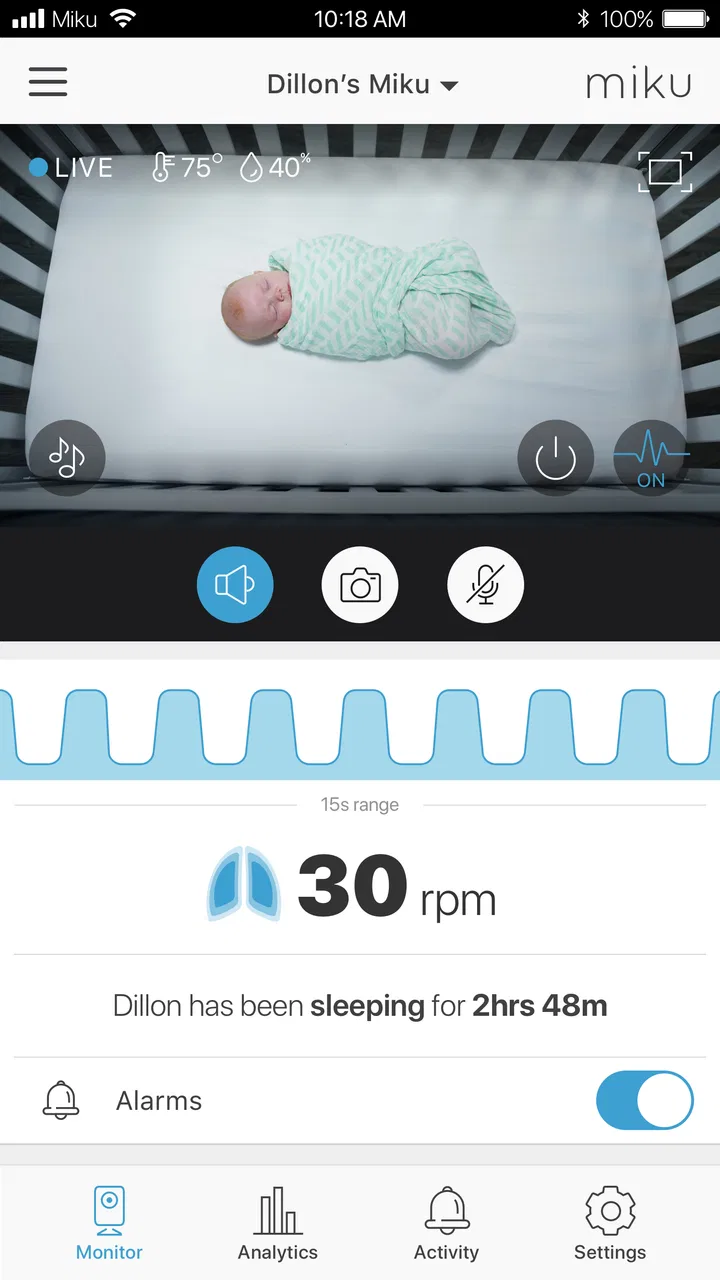
I approached MIKU as a parenting app rather than a general baby monitor, and that distinction matters. Its job is to work with a Miku device so I can check video, listen to audio, and keep an eye on breathing from one place. That makes the app most useful during the quiet stretches when I do not want to open the nursery door and risk disturbing a sleeping child.
The app is free to install, is intended for Everyone, and comes from MIKU, INC. It has been available since June 1, 2018, and the current release is version 1.4.3 for devices running Android 5.0 or later. Those details make it accessible to many older phones, although the real experience depends heavily on owning and setting up the matching Miku hardware. This is not a standalone camera app that can turn an ordinary phone into a complete monitoring system.
How the everyday monitoring routine works
My basic workflow with MIKU is straightforward: I place the Miku device where it has a useful view of the sleep area, open the app, and use the live screen when I need reassurance. Video gives me visual context, audio helps me notice movement or crying, and breathing information adds another layer to the check. The value comes from having these signals together instead of switching between a camera feed and a separate audio monitor.
You May Also Like

 Blood Strike: 2.5 Anniversary
Blood Strike’s Loadouts Turn Every Drop Into a Tactical Gamble
A close look at Blood Strike’s custom loadouts: how fast access to signature weapons reshapes its battle royale rhythm, rewards preparation, and narrows the gap between fights.

 Pandora - Music & Podcasts
Pandora’s Music Is Easy to Start, but Harder to Recover
Pandora’s strength is its low-effort path from a seed to a station. Its weak spot is how much confidence it asks you to place in connection, setup, and quiet recovery.

 8 Ball Pool
 Is Built on Rivalries, Rematches, and Routine
A close look at the rivalries, rematches, shared routines, and unanswered safety questions that turn a quick pool match into a persistent mobile community.

 Samsung Music
’s Quiet Strength Is Playing What You Already Own
Its reach comes less from spectacle than from dependable access to a personal library. That simplicity is both the app’s strongest retention engine and its ceiling.

 AccuWeather: Weather Radar
AccuWeather Review: A Quick, Clear Forecast for Everyday Decisions
For everyday plans, the best forecast is the one you can understand quickly. AccuWeather makes rain timing, radar, and local conditions easy to act on, with a few trade-offs.

 Hill Climb Racing
Why Hill Climb Racing Still Turns Crashes Into One More Run
A tiny car, a bumpy hill and one more upgrade: Hill Climb Racing keeps resurfacing because its simple chaos makes every near-miss feel personal.
More From Our News Desk



A realistic evening use case is a child settling down after a feed. I can leave the room, wait a little, and check the app before deciding whether to go back in. If the child is visibly awake, I do not need to guess from a sound alone. If the room looks calm, the breathing view can provide additional reassurance. I still treat the display as a monitoring aid, not as a replacement for physically checking on a child when something seems wrong.
The first setup should be approached slowly. I would position the device before bedtime, confirm that the camera view covers the intended area, and test the audio at the normal volume used in the room. A feed that looks acceptable during the day may be less useful at night if furniture, blankets, or a changed sleeping position block the view. The app cannot compensate for poor placement, so this is one of the most important parts of the whole system.
There is also a practical habit I recommend: check the live view from the location where you normally sit or sleep, rather than only standing beside the device. That reveals whether the image is genuinely readable at a glance. Parents often need a quick answer while holding a baby, preparing a bottle, or moving through the house. If the scene takes too long to interpret, the technology becomes less convenient than it should be.
MIKU has passed 50K installs, but its relatively low 1.5 average from roughly 1.4K ratings and 941 reviews is an important warning for anyone expecting a flawless experience. I would not interpret that figure as proof that every household will have trouble, but I would take it as a reason to test the complete setup early, before depending on it for overnight monitoring.
Settings I would check before relying on it
The most valuable settings are the ones that affect how quickly I can understand what is happening. I would begin with notification behavior, sound levels, and any available monitoring preferences exposed by the app and connected device. The exact choices that suit one family may be irritating for another: a parent sleeping close to the nursery may want fewer interruptions, while someone working in another room may prefer a more noticeable alert.
I also pay attention to the difference between a useful alert and constant background noise. If every small sound demands attention, I become tempted to ignore the phone. A better routine is to adjust the setup around the child’s normal sleep environment, then observe whether alerts help me act or merely make me check the screen repeatedly. MIKU works best when it reduces uncertainty, not when it creates a new stream of notifications to manage.
Before changing anything important, I would run a short daytime test. Ask another adult to move around the room, make ordinary sounds, and briefly leave the camera’s view. This does not prove how the system will behave in every situation, but it helps reveal whether the placement and alert style fit the room. Testing in daylight is also easier than troubleshooting while everyone is tired.
Breathing information deserves especially careful attention. I see it as one part of the overall picture, alongside the video and audio, rather than a medical measurement that can settle every concern. If the reading or visual situation seems unusual, I would check the child directly and follow appropriate professional guidance. No app should encourage a parent to delay an in-person check when the child appears unwell.
Another useful setting-related habit is keeping the phone itself ready. A quiet monitoring app is not much help if the phone is buried under cushions, muted in a way that hides important sounds, or nearly out of power. I would choose a consistent place for the phone and make sure the display and audio behavior match the way the household actually operates. This is mundane, but it prevents many avoidable failures.
Faster patterns for repeated checks
Experienced use is less about staring at the feed and more about creating a repeatable checking pattern. I would open MIKU for a specific reason: to confirm sleep, investigate a sound, inspect the room, or review breathing information. That makes each visit to the app shorter and more purposeful. Leaving the live view open continuously may feel reassuring, but it can also encourage unnecessary checking and drain attention.
A simple sequence works well for me: look at the whole scene first, listen for a moment, then consider the breathing information in context. Starting with the broad view prevents me from fixating on one signal. For example, a sound may be harmless if the child is visibly repositioning, while a quiet image may deserve a closer look if the breathing information seems inconsistent with what I expect.
I would also make the camera angle part of the bedtime routine. If the crib or sleep space changes during the day, a quick visual confirmation before lights-out is worthwhile. This is a non-obvious strength of having video alongside audio: I can catch a shifted blanket, a changed sleeping position, or an obstructed view without entering immediately. The trade-off is that the camera only helps when its field of view remains appropriate.
For families sharing responsibility, consistency matters. Everyone should know where the device is aimed, what a normal view looks like, and when an in-person check is preferable to another glance at the screen. MIKU does not replace household communication. In practice, a shared routine is more reliable than assuming that whoever happens to notice an alert will understand its significance.
I would avoid treating the app as a background guarantee while doing demanding tasks. If I am cooking, showering, driving, or caring for another child, I should not assume that a phone alert removes the need for sensible supervision. The app can extend awareness, but it cannot eliminate the limits of distance, connectivity, attention, or the camera’s view.
Where the combined approach is genuinely useful
The combination of video, audio, and breathing is most useful when one signal alone leaves too much room for doubt. Audio can tell me that something happened, but not always what happened. Video can show movement, but a quiet image may not explain whether the child is sleeping comfortably. Breathing information can add context, yet it should still be interpreted alongside the visible scene and the child’s condition.
This makes MIKU a better fit for parents who want a single monitoring workflow around compatible hardware. Compared with a basic audio monitor, it offers a richer view of the room. Compared with a conventional camera, its breathing-focused purpose gives the monitoring experience a more specific direction. The compromise is that it is not as flexible as a generic camera solution: I cannot simply install it and use whatever camera I already have.
It can also be helpful during naps when a parent is nearby but occupied. I might be folding laundry, working at a desk, or preparing food and want a quick way to check whether a noise means the child is awake. The app is especially convenient when walking into the room would interrupt a fragile nap. Still, I would keep the check brief and remember that a digital view is not the same as being physically present.
For a household already committed to the Miku device, the app’s integrated design is its main reason to choose it. For someone comparing products from scratch, the hardware requirement should be weighed against simpler alternatives. An audio-only monitor may be cheaper and less complicated for a family that only needs sound. A regular camera may be preferable for someone who values broad compatibility or already owns a trusted system.
Limits that become clearer with advanced use
The biggest limitation is the dependency between the app and Miku hardware. The software’s usefulness is inseparable from the device’s placement, operation, and connection. If the camera is poorly positioned or the household’s phone habits are unreliable, the polished idea of unified monitoring quickly becomes less impressive.
I am also cautious about overconfidence. A breathing view can feel authoritative because it presents specialized information, but parents should not mistake a screen for clinical assessment. If a child looks distressed, has unusual breathing, or seems unwell, the correct response is direct attention and appropriate medical help, not repeated refreshing of the app.
The app’s rating history suggests that reliability and user experience may not feel consistent for everyone. That is why I would install it and perform a full trial while the child is awake, then repeat the test during a normal nap. I would check whether the video remains useful from the usual phone location, whether audio is noticeable without being overwhelming, and whether the family can follow the same routine without confusion.
Cost is another consideration even though the app itself is free. In-app purchases range from $9.99 to $299.99 per item, so I would review any purchase screen carefully before committing. The free download should not be confused with a promise that every possible part of the wider Miku experience carries no cost. Families should decide what they actually need and avoid paying for extras simply because they sound reassuring.
There is also a psychological limit. Monitoring can reduce worry, but it can just as easily encourage compulsive checking. If I find myself reopening the app every few minutes despite a normal scene, the tool is no longer serving the routine. Setting clear check points and trusting sensible household practices can make the technology healthier to use.
Who should use it, and who should choose something else?
I would recommend MIKU to parents who already have, or specifically want, a Miku device and who value having video, audio, and breathing information in one parenting-focused app. It is a sensible match for families who want to check a sleeping child without entering the room and who are willing to spend time testing placement and notification behavior.
I would be more hesitant for someone seeking a standalone app, a simple audio monitor, or a universally compatible camera viewer. It is also not my first choice for a parent who wants to treat app readings as medical certainty. The right alternative depends on the need: basic sound monitoring favors simplicity, while a general camera favors flexibility. MIKU makes the strongest case when its specific monitoring approach matches the household.
Because the app is free and supports Android 5.0 or later, trying the software is relatively approachable, but that does not remove the need to evaluate the complete setup. I would not judge it after only opening the app once. The meaningful test is whether it remains understandable and dependable during an ordinary bedtime, with the phone placed where it will actually be used.
My final view is mixed but useful: MIKU has a clear purpose and a thoughtful combination of signals, yet it demands realistic expectations. I like the way it can turn a quick check into a more informed one, especially when video and audio alone leave questions. I do not like the possibility of overreliance, the hardware dependence, or the gap between a free app download and potentially expensive in-app purchases.
My recommendation is to treat MIKU as a supporting layer of awareness, not as a substitute for attentive parenting or medical judgment. If you own the compatible device and build a calm routine around placement, alerts, and brief checks, it can be genuinely helpful. If you want the lowest-cost or simplest monitoring path, a basic audio solution may serve you better. MIKU is worth considering for its focused approach, but I would only make it part of my household after a careful real-world trial.
FAQs for MIKU
01What is MIKU and what can I use it for?
MIKU is an app focused on providing users with access to MIKU-related content and features in one place. Depending on the version and platform, it may include music, videos, news, community content, events, or interactive experiences. Before downloading, check the official store description because available functions can vary by country, device, and app updates.
02Is MIKU free to download and use?
MIKU may be available as a free download, but some features or content can require in-app purchases, subscriptions, or payments for selected items. The basic installation does not necessarily mean that every function is free. I recommend reviewing the pricing information shown in Google Play or the App Store, including renewal terms, before confirming any purchase.
03Does MIKU require an account or an internet connection?
Some MIKU features may work without registration, but an account can be necessary for personalized content, saved preferences, purchases, synchronization, or community functions. A stable internet connection is generally recommended, especially for streaming, online updates, and interactive content. Offline availability depends on the specific version, so do not assume that all features work without mobile data or Wi-Fi.
04Is MIKU safe to install on Android and iPhone?
The safest way to install MIKU is through the official Google Play Store or Apple App Store rather than downloading modified APK files or unknown third-party packages. Before installing, verify the developer name, permissions, privacy information, ratings, and recent update history. Keep your operating system updated, and avoid granting access that does not appear necessary for the app’s advertised features.
05What devices and permissions does MIKU support?
MIKU’s compatibility depends on the operating system version, available storage, and the particular release offered in your region. The app may request permissions such as notifications, network access, storage, microphone, or camera access if those functions are included. Check the store’s compatibility section before downloading, and remember that older devices may experience slower performance or limited features.
Pros
- Simple interface makes core features easy to find.
- Supports creative interaction with MIKU-themed content.
- Lightweight design should run well on many devices.
- Regular use can feel engaging for fans of virtual characters.
- Suitable for quick sessions when you have limited free time.
Cons
- Some features may require an internet connection.
- Content can feel limited if you are not a MIKU fan.
- Personalization options may not be extensive.
- Older devices may experience slower loading or occasional lag.
- The app may include ads or optional in-app purchases.

MIKU
Gallery